I can't believe it has been so long since I've posted. It must be all the farming and babysitting.
Anyway, about Yahoo's SiteBuilder and embedding a PDF.
I've been maintaining a site for a few years using SiteBuilder. When I went to Windows 7, I'd often get a message from SiteBuilder saying it had just recovered from a serious error. I didn't pay much attention because everything would load ok. One day, SiteBuilder totally crashed. I called Yahoo and was told that there were compatibility issues with SiteBuilder and Windows 7, and that they weren't going to address them. They're encouraging everyone to move to Site Solution. I had a fit. I tried uninstalling and starting with a fresh SiteBuilder. No luck, so I had no choice but to start over using Site Solution. At first, I didn't like it. You have to use a template. There are restrictions with layouts. But, there are some great features, especially the PDF issue. It pops a PDF into the site with one click. It's also web based, so you don't have to download any software program. I'm glad I was forced to make the switch, otherwise, I'd still be muddling around with SiteBuilder.
Here's a link to an older post on embedding PDFs
http://deskdiva.blogspot.com/2008/08/pdf-files-and-yahoos-sitebuilder.html
Showing posts with label pdf. Show all posts
Showing posts with label pdf. Show all posts
Thursday, May 19, 2011


Monday, August 18, 2008
How to Embed PDF file in Yahoo's Sitebuilder
Embedding a PDF file into a Yahoo Sitebuilder page -
Here's a Yahoo Sitebuilder tip. I really just want to have it handy, because I know I'll forget how to do it the next time it comes up, and I won't be able to find the little piece of paper with the instructions.
I wanted to have one of the pages in a website open a PDF file (embed a PDF document). In this case, a newsletter created as a PDF. I looked everywhere in their Help section for the answer, and couldn't find a clue, so I called them up. That's one nice thing about Yahoo's web hosting - you can get a real person in the U.S. who knows answers. Here's how to do it:
So, if your pdf file is abc.pdf, save your new, blank page, as abc.html. I'll have to try it out and see if it's necessary.
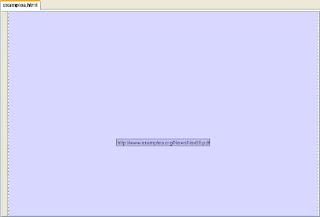
The page will look like this - to see if it worked, do a 'preview in browser'. If it did, your pdf file will appear.
 Here's an update - SiteBuilder crashed, now using Site Solution (Yahoo), and it's so easy to pop a PDF file in! (May 26, 2011)
http://deskdiva.blogspot.com/2011/05/yahoo-sitebuilder-crashed.html
Here's a Yahoo Sitebuilder tip. I really just want to have it handy, because I know I'll forget how to do it the next time it comes up, and I won't be able to find the little piece of paper with the instructions.
I wanted to have one of the pages in a website open a PDF file (embed a PDF document). In this case, a newsletter created as a PDF. I looked everywhere in their Help section for the answer, and couldn't find a clue, so I called them up. That's one nice thing about Yahoo's web hosting - you can get a real person in the U.S. who knows answers. Here's how to do it:
- Save your PDF file to your desktop - give it a simple name.
- Open Yahoo Sitebuilder.
- Drag the PDF file over to your Contents - this might take a few tries, but it'll get there.
- Open a new, blank page with no template.
- Click on Insert at the top of the screen.
- Select Code Elements - then select Iframe
- Choose - 'Another website'.
- In the little box type the domain name of your site - http:// is already given to you, so start with www.
- At the end of your website domain name give it a / then type the name of the PDF file exactly as it appears on your contents list.
- Your page will now be a pale purple, and there will be a little box, like a text box with the domain name and the / and the pdf file name.
- Save & publish. It should work. Good luck.
So, if your pdf file is abc.pdf, save your new, blank page, as abc.html. I'll have to try it out and see if it's necessary.
The page will look like this - to see if it worked, do a 'preview in browser'. If it did, your pdf file will appear.
 Here's an update - SiteBuilder crashed, now using Site Solution (Yahoo), and it's so easy to pop a PDF file in! (May 26, 2011)
http://deskdiva.blogspot.com/2011/05/yahoo-sitebuilder-crashed.html
Subscribe to:
Posts (Atom)